
Concept
This article details the use case of a customer with multiple sites and how it can be set up with overlapping extensions where each site is a separate domain. They want to be able to dial a site code prefix and call from one site (domain) to another; for example, dial 10111 from the Seattle office to reach extension 111 in the New Orleans office.
Definitions
- Interdomain - between two domains on the same server; for example, ABC Company can dial ACME company by dialing a prefix followed by the extension number.
Rules
- Dial rules that will be used for multiple customer domains are best placed in a shared dial translation such as Default or Cloud PBX Features.
- Dial Rules to be used for a few specific domains are best placed in a new dial translation that is shared between the specific domains.
- Dial Rules to be used for only one specific domain are best placed in the domain dial translation.
Procedure
Create Dial Translation for Interdomain Dialing
- In the Admin UI of the Core Module navigate to Dial Planning > Dial Translation and click on New Dial Translation.
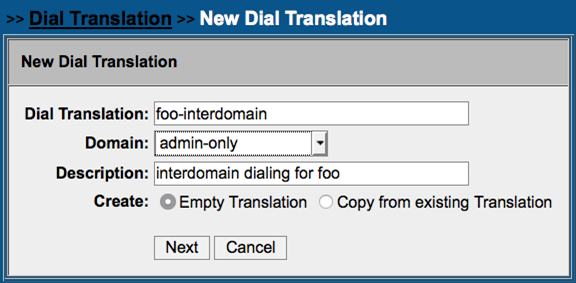
- Create a new dial translation as shown below; in this example we will name the dial translation foo-interdomain.
- In the foo-interdomain dial translation, we will make rules like the one shown below to match the three-digit dial with a prefix.
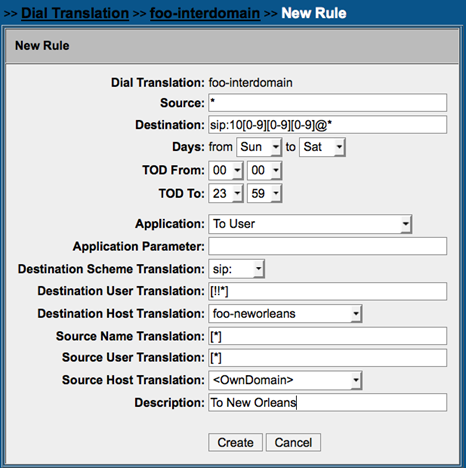
- You can see that in the rule that we created the prefix is stripped in the Destination User Translation and the Destination Host Translation is changed to the target domain; that is, the domain that we are dialing.
- Clone this rule for any additional sites you wish to create using other prefixes.
- The next step is to chain each domain’s dial translation to the foo-interdomain table for processing. We will chain from each domain to the foo-interdomain dial translation and then to <Cloud PBX Features>.
- In each domain’s dial translation table identify the chaining rule (destination and source *)
- Edit it, set the application as <<Dial Plan>> (found at the bottom of the drop-down list) and click Create.
- The page will refresh and for the application enter: <foo-interdomain><Cloud PBX Features>
- This will cause the system to try and match the foo-interdomain dial translation first, and if no match is made, it will try the Cloud PBX Features dial translation next.
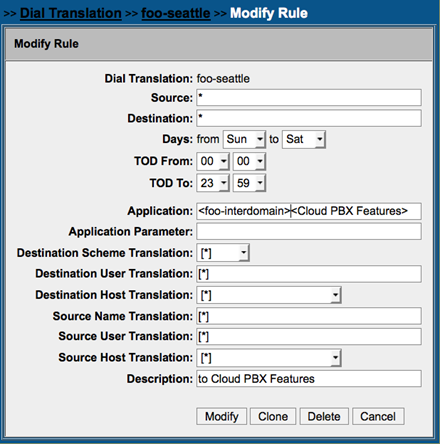
- Once the chaining has been done for each domain, you can test and you should be able to dial between domains.